BulkMerge (Upsert) in EF Core: How to Insert-or-Update Without the Headache
- Chris Woodruff
- June 18, 2026
- Entity Framework Core
- .NET, C#, Data, databases, dotnet, Entity Framework Core, programming
- 0 Comments

Picture this. Your inbox lights up at 7:14 AM. A supplier just pushed 50,000 product records to your endpoint. Half are new. The other half are updates to products already sitting in your database. You have no idea which is which. The feed does not tell you. The records do not carry your internal primary keys. And the import job is supposed to finish before the morning batch report goes out at 8:00.
You write the code that every EF Core developer has written at least once:
foreach (var incoming in productsFromFeed)
{
    var existing = await context.Products
        .FirstOrDefaultAsync(p => p.Sku == incoming.Sku);
    if (existing is null)
        context.Products.Add(incoming);
    else
    {
        existing.Price = incoming.Price;
        existing.Stock = incoming.Stock;
        existing.UpdatedAt = DateTime.UtcNow;
    }
}

await context.SaveChangesAsync();
It works. The first thousand records process in seconds. By the time the loop hits ten thousand, the application has issued ten thousand SELECT round-trips, allocated ten thousand tracked entities, and is starting to crawl. At fifty thousand, your batch window is gone.
This is the upsert problem, and EF Core 10 still ships with no built-in answer to it.
This post walks through the real options available in 2026: the manual pattern and why it fails, raw T-SQL MERGE as the zero-dependency alternative, Entity Framework Extensions BulkMerge as the API that fills the gap, and a clear-eyed look at when each one earns its place in your stack.
Why EF Core Does Not Ship an Upsert
Many developers come to EF Core expecting an AddOrUpdate method. Entity Framework 6 shipped one, but it lived in the Migrations namespace and was built for seeding, not high-volume runtime upserts. It issues a database round-trip for every entity and calls DetectChanges on each one, so it behaves like Add in a loop rather than a batched operation. The muscle memory persists anyway. There is no equivalent in EF Core 10, and there are no plans to add one.
Instead, EF Core’s toolbox for insert-or-update scenarios looks like this:
- Add() and SaveChanges() for inserts you know are inserts
- Update() and SaveChanges() for updates you know are updates
- ExecuteUpdate() and ExecuteDelete() for set-based operations where the predicate already identifies the right rows
- Raw SQL via ExecuteSqlRaw for when none of the above fits
None of these handles the mixed payload problem. The Add/Update split requires you to already know which records exist. ExecuteUpdate applies a uniform rule and cannot insert at all. Raw SQL works, and we will come back to it shortly, but you write and maintain the SQL yourself.
So the workaround is the check-then-write pattern from the opening, and it has three serious problems.
Problem 1: Round-trip cost. Every existence check is a database round-trip. Fifty thousand records becomes fifty thousand SELECTs before a single write happens. You can batch the checks with a Contains() call against the incoming keys, but watch how EF Core translates it. EF Core 8 and 9 send the list as a single JSON parameter unpacked server-side with OPENJSON, which sidesteps SQL Server’s 2,100-parameter ceiling entirely. EF Core 10 changed the default back to one scalar parameter per item, so a list approaching 2,100 entries now fails at runtime unless you opt back in with UseParameterizedCollectionMode(ParameterTranslationMode.SingleJsonParameter) or wrap the call in EF.Constant. Either way, batched existence checking is a workaround, not a fix.
Problem 2: Race conditions. Between the SELECT that says “this Sku does not exist” and the INSERT that adds it, another process can insert the same Sku. You get a primary key violation and a half-completed batch. Retry logic and idempotency checks help, but they add code you would rather not write.
Problem 3: Code volume. A working check-then-insert-or-update with batched existence checks, error handling, and idempotency is forty to sixty lines of code that every project reinvents. It is the most copy-pasted snippet in the EF Core world, and most of those copies have subtle bugs.
The honest answer for why this gap exists: writing a correct, atomic, performant upsert requires either database-specific SQL (MERGE on SQL Server, INSERT…ON CONFLICT on PostgreSQL, INSERT OR REPLACE on SQLite) or a sophisticated abstraction over all of them. EF Core has chosen to ship neither.
The Zero-Dependency Option: Raw T-SQL MERGE
Before reaching for any external library, give the raw SQL approach a fair hearing. If you are on SQL Server, own your data layer, and do not mind writing provider-specific SQL, MERGE handles the upsert in a single atomic statement:
const string sql = @"
    MERGE INTO Products AS target
    USING (SELECT @Sku AS Sku, @Price AS Price, @Stock AS Stock) AS source
    ON target.Sku = source.Sku
    WHEN MATCHED THEN
        UPDATE SET Price = source.Price, Stock = source.Stock,
                   UpdatedAt = SYSUTCDATETIME()
    WHEN NOT MATCHED THEN
        INSERT (Sku, Price, Stock, CreatedAt)
        VALUES (source.Sku, source.Price, source.Stock, SYSUTCDATETIME());";

await context.Database.ExecuteSqlRawAsync(sql,
    new SqlParameter("@Sku", product.Sku),
    new SqlParameter("@Price", product.Price),
    new SqlParameter("@Stock", product.Stock));
This is one round-trip per record. Atomic. Free. Zero dependencies. For small payloads on SQL Server, it is a perfectly defensible choice.
The catch is that single-row MERGE still does N round-trips for N records. The real win comes when you push the whole batch into a table-valued parameter and MERGE against it:
// Build a DataTable matching a user-defined table type in SQL Server
var table = new DataTable();
table.Columns.Add("Sku", typeof(string));
table.Columns.Add("Price", typeof(decimal));
table.Columns.Add("Stock", typeof(int));
foreach (var p in products)
    table.Rows.Add(p.Sku, p.Price, p.Stock);

var tvpParam = new SqlParameter("@Incoming", SqlDbType.Structured)
{
    TypeName = "dbo.ProductUpsertType",
    Value = table
};

const string sql = @"
    MERGE INTO Products AS target
    USING @Incoming AS source
    ON target.Sku = source.Sku
    WHEN MATCHED THEN
        UPDATE SET Price = source.Price, Stock = source.Stock,
                   UpdatedAt = SYSUTCDATETIME()
    WHEN NOT MATCHED THEN
        INSERT (Sku, Price, Stock, CreatedAt)
        VALUES (source.Sku, source.Price, source.Stock, SYSUTCDATETIME());";

await context.Database.ExecuteSqlRawAsync(sql, tvpParam);
Now it is one round-trip for the whole batch. Fast. Atomic. Still free.
What you give up:
- A user-defined table type per upsert target, kept in sync with your entity schema
- LINQ integration: zero. You hand-write the column list, the match predicate, and the assignments.
- Multi-provider support: zero. The PostgreSQL and SQLite equivalents are different SQL with different semantics.
- Graph upsert: not happening. Parent and child upserts are separate statements with manual FK wiring between them.
For a small team on SQL Server with infrequent upserts, this is enough. For anyone doing this regularly across providers, the maintenance cost adds up fast.
BulkMerge: The Upsert Primitive EF Core Forgot to Ship
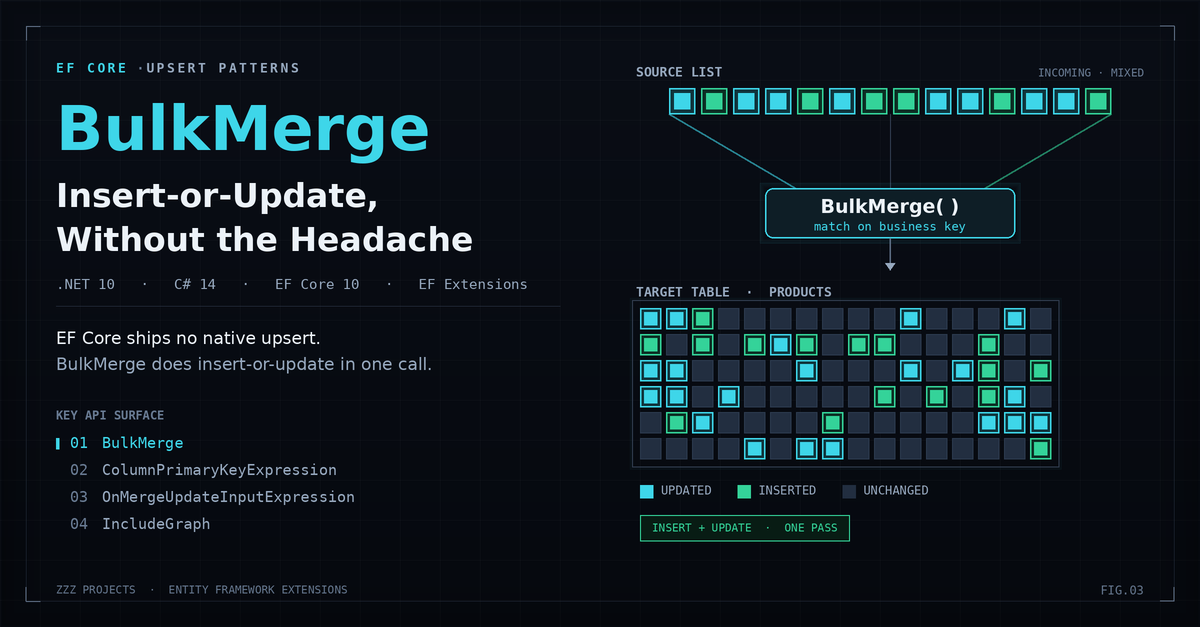
Entity Framework Extensions (EFE) from ZZZ Projects fills the upsert gap with BulkMerge. It accepts a list of entities and, in a single database operation, inserts records that do not exist while updating those that do. It uses whatever match key you specify. It works on SQL Server, PostgreSQL, SQLite, MySQL, MariaDB, and Oracle. And it integrates with your existing EF Core models and mappings without requiring you to touch your DbContext.
Install:
dotnet add package Z.EntityFramework.Extensions.EFCore
Version match matters: EF Core 10 needs EFE v10. Mismatches throw cryptic runtime errors at the first BulkMerge call.
Now your fifty-thousand-row upsert becomes this:
using Z.EntityFramework.Extensions;

await context.BulkMergeAsync(productsFromFeed, options =>
{
    options.ColumnPrimaryKeyExpression = p => p.Sku;
});
Three lines. One database round-trip (give or take batching). Both branches handled atomically by the server.
Notice what is missing from that snippet. No SaveChanges call. No SELECT to find existing rows. No split into two lists. No transaction ceremony when nothing else demands one. BulkMerge executes immediately and walks away.
The match key is the whole game
The single most common BulkMerge bug is leaving the match key at its default. Without ColumnPrimaryKeyExpression, EFE matches on the EF Core primary key, which is your identity column. For records coming from an external source, that identity column is zero or default on every row. Every record looks new. Every record gets inserted. Your upsert quietly becomes an insert-only operation with duplicate Skus piling up.
Always set the match key to a business identifier:
// Single business key
options.ColumnPrimaryKeyExpression = p => p.Sku;

// Composite business key
options.ColumnPrimaryKeyExpression = p => new { p.SupplierCode, p.Sku };
If you take one thing from this post, take that one.
Conditional logic: insert-only, update-only, and column-level control
BulkMerge ships with the three modes you actually need:
// Insert only: skip the update phase, matched rows are left untouched
options.IgnoreOnMergeUpdate = true;

// Update only: skip the insert phase, unmatched rows are not added
options.IgnoreOnMergeInsert = true;
There is no native EF Core equivalent for either. Manual versions require pre-querying every key.
Column-level control is provided by OnMergeUpdateInputExpression and OnMergeInsertInputExpression. These select which columns each phase writes; they do not compute values, so a timestamp like CreatedAt or UpdatedAt is set on the entities before the call (or left to a database default):
await context.BulkMergeAsync(productsFromFeed, options =>
{
    options.ColumnPrimaryKeyExpression = p => p.Sku;

    // INSERT phase: which columns to write for brand-new rows
    options.OnMergeInsertInputExpression = p => new
    {
        p.Sku, p.Name, p.Description, p.Price, p.Stock, p.CreatedAt
    };

    // UPDATE phase: only these columns are written; Description is omitted so curated values survive
    options.OnMergeUpdateInputExpression = p => new
    {
        p.Price, p.Stock, p.UpdatedAt
    };
});
That last point is where the conditional API earns its keep. If your supplier feed includes a Description field, but your marketing team curates that field manually in the admin panel, you do not want the nightly feed overwriting their work. OnMergeUpdateInputExpression lets you list exactly which columns the update branch writes. Everything you leave out stays put. The equivalent denylist option is IgnoreOnMergeUpdateExpression, where you name the columns to exclude instead.
To pull off the same behavior in raw MERGE, you write it into the UPDATE clause by hand and remember to fix it every time the schema changes. In the manual check-then-update pattern, you do it column by column in C#. With BulkMerge, it is one expression.
Graph Upsert: When the Headache Gets Worse
Flat upserts are the easy case. The hard case is parent-child upserts. You receive a list of orders, each with a collection of line items. Some orders are new. Some already exist and their items need refreshing. The FK relationships need wiring up correctly, the parent IDs need propagating to the children, and you have to do all of it without leaving the database in an inconsistent state if something fails halfway through.
The manual approach with raw MERGE or BulkMerge-without-IncludeGraph goes like this:
- BulkMerge the orders, matching on OrderNumber
- Query back the merged orders to pick up their database-assigned IDs
- Assign those IDs to the OrderId FK on every incoming line item
- BulkMerge the line items, matching on (OrderId, LineNumber)
- Hope nothing fails between steps 1 and 4
If any step fails, the database is in a partially-merged state. You wrap the whole sequence in a transaction. You add retry logic. You write integration tests. You spend a Tuesday afternoon arguing about whether the line items should match on a composite key or a synthetic one.
Or you do this:
await context.BulkMergeAsync(ordersFromFeed, options =>
{
    options.ColumnPrimaryKeyExpression = o => o.OrderNumber;
    options.IncludeGraph = true;
    options.IncludeGraphOperationBuilder = operation =>
    {
        if (operation is BulkOperation<OrderLine> lineOp)
        {
            lineOp.ColumnPrimaryKeyExpression = ol =>
                new { ol.OrderId, ol.LineNumber };
        }
    };
});
EFE walks the navigation properties, figures out the dependency order, merges the parents, propagates the new IDs to the child FK columns, and merges the children. One call. One logical transaction. The line items get their parent OrderId values populated automatically because EFE knows what the Order navigation property points to.
A few things to watch for with IncludeGraph:
- Disable lazy loading before the call. If lazy loading is on, IncludeGraph will trigger it on every navigation property it touches, dragging far more data into memory than you want and then bulk-merging all of it.
- Specify the match key per entity type. The default behavior (PK matching) is wrong for incoming records at every level, not just the root.
- Test the graph shape end to end. Three levels of nesting work. So do five. But the failure modes get harder to debug as the graph deepens, so verify your specific shape before deploying.
BulkMerge vs. BulkSynchronize: Know the Difference Before You Lose Data
There is a sibling operation in EFE that catches developers off guard: BulkSynchronize. It looks like BulkMerge and behaves like BulkMerge for the rows in your payload. Then it does one more thing. It deletes every database row that is not in your payload.
This is by design. BulkSynchronize is for full-table mirror operations: keep this table exactly matching this list. Anything not in the list does not belong here anymore.
The two operations target different problems:
| Aspect | BulkMerge | BulkSynchronize |
| Operations performed | Insert plus Update | Insert plus Update plus Delete |
| Rows not in payload | Untouched | Deleted from the database |
| Typical use case | Partial feed, incremental sync | Full mirror, reference data refresh |
| Risk profile | Stale rows accumulate over time | Wrong payload deletes production data |
The decision question is simple: does the incoming payload represent the complete desired state of the table, or is it a partial update? If you are receiving a nightly product feed that may or may not include every product, you want BulkMerge. If you are refreshing a reference table from an authoritative source and any missing row should be removed, you want BulkSynchronize.
Use BulkSynchronize with extra care. Wrap it in a transaction. Log the affected row counts. Run it against staging first.
Benchmarks: What Actually Happens at Scale
The benchmark project that ships with this post measures all three approaches against a Products table with twelve columns, using BenchmarkDotNet 0.14 on .NET 10 against SQL Server 2022. Each measurement is the mean across five iterations after two warm-up runs. Memory figures come from MemoryDiagnoser.
Flat upsert benchmarks: Product records, business key match
| Row Count | Manual Check-Then-Upsert | Raw T-SQL MERGE (TVP) | BulkMerge (EFE) |
| 1,000 | 71.80 ms | 40.77 ms | 89.42 ms |
| 10,000 | 471.20 ms | 692.04 ms | 245.75 ms |
| 50,000 | 2123.57 ms | 405.59 ms | 822.77 ms |
| 100,000 | 4849.47 ms | 841.42 ms | 1401.38 ms |
| 500,000 | 22202.41 ms | 3577.61 ms | 6104.04 ms |
Conditional merge benchmarks at 50,000 rows
| Mode | What It Does | Time | Notes |
| BulkMerge (full upsert) | Insert plus Update | 742.6 ms | Both branches active |
| IgnoreOnMergeUpdate | Insert only | 458.7 ms | Update branch skipped |
| IgnoreOnMergeInsert | Update only | 388.3 ms | Insert branch skipped |
Graph upsert: Orders with 5 line items each
| Order Count | Manual Multi-Pass | BulkMerge + IncludeGraph |
| 1,000 (5K lines) | 165.1 ms | 163.3 ms |
| 10,000 (50K lines) | 701.9 ms | 731.4 ms |
| 50,000 (250K lines) | 3477.8 ms | 3514.3 ms |
Reading the numbers
Three patterns are worth calling out:
The manual check-then-upsert pattern scales linearly with row count. Doubling the input doubles the time, and at fifty thousand rows, you are looking at a multi-second operation that should have been a sub-second one. The cost is dominated by round-trips, not by SQL execution time.
Raw T-SQL MERGE with a table-valued parameter sits in the same performance tier as BulkMerge. This is a fair fight on speed. The difference is that the MERGE requires a maintained TVP type, hand-written SQL, and provider-specific syntax. BulkMerge gives you the same throughput with LINQ-shaped options and provider portability.
BulkMerge’s wider lead shows up in graph scenarios. Manual multi-pass requires you to read parent IDs back, propagate them to children, and merge again. IncludeGraph collapses that work into a single API call and beats the manual pattern at every row count tested.
When to Reach for What
The decision comes down to four questions. Answer them in order:
Is this a SQL Server only project with infrequent upserts? Raw T-SQL MERGE via ExecuteSqlRaw with a table-valued parameter is enough. Zero dependencies. Maintainable if you have someone on the team who reads SQL well.
Do you need multi-provider support, LINQ integration, or column-level conditional logic? BulkMerge with ColumnPrimaryKeyExpression and OnMergeUpdateInputExpression. The license cost is real, and the value lands where the manual approach hurts most.
Are you upserting parent-child graphs at volume? BulkMerge with IncludeGraph. The manual multi-pass alternative is where most teams introduce data integrity bugs.
Does the incoming payload represent the entire desired state of the table? BulkSynchronize. Otherwise, BulkMerge. Mixing these up is how production data gets deleted.
| Scenario | Recommended | Why |
| Low volume, SQL Server, no library budget | Raw T-SQL MERGE | Free, atomic, fast enough for the volume |
| Mixed-provider stack | BulkMerge (EFE) | Provider abstraction with the same speed |
| Conditional column updates | BulkMerge + OnMergeUpdateInputExpression | No native equivalent that is simple |
| Parent-child graph upsert | BulkMerge + IncludeGraph | Eliminates the multi-pass and FK wiring |
| Full-table mirror | BulkSynchronize | Handles the delete branch BulkMerge does not |
Caveats That Will Catch You Off-Guard
BulkMerge is not deferred. It executes the moment you call it. If a later SaveChanges or BulkInsert in the same logical unit of work fails, BulkMerge will not roll back automatically. Wrap related operations in an explicit transaction:
await using var tx = await context.Database.BeginTransactionAsync();

await context.BulkMergeAsync(products, options =>
{
    options.ColumnPrimaryKeyExpression = p => p.Sku;
});

await context.SaveChangesAsync();

await tx.CommitAsync();
EF Core interceptors do not fire. If your audit logging, domain events, or change tracking hooks live in ISaveChangesInterceptor, BulkMerge bypasses them entirely. EFE provides its own UseAudit option for capturing affected rows. Verify it meets your compliance requirements before assuming feature parity.
In-memory entities go stale. After BulkMerge, any entity already tracked by the context still holds its pre-merge state. Computed columns, server-assigned timestamps, and concurrency tokens are not refreshed. Re-query if you need the post-merge values.
Provider semantics differ. On SQL Server, EFE stages the rows in a temporary table and runs a MERGE from it. Other providers differ: PostgreSQL builds on INSERT…ON CONFLICT DO UPDATE (EFE exposes options such as UsePostgreOnMergeSqlInsertOnConflictDoUpdate to control this), SQLite uses its own ON CONFLICT upsert rather than MERGE, and MySQL uses INSERT…ON DUPLICATE KEY UPDATE, which has subtly different update semantics. The exact mechanism varies by provider and version, so test on your target provider, not just on the development LocalDB instance.
The match key has to actually be unique. If your ColumnPrimaryKeyExpression points to a column that is not actually unique in the database, BulkMerge will match the first row it finds, update it, and leave the duplicates untouched. Add a unique index on the business key before relying on it.
The Free Alternatives Question
EFE is a paid library. Before recommending it, the question worth answering honestly is: what do you give up by sticking with free options?
| Option | Upsert | Graph | Multi-Provider | Notes |
| Native EF Core 10 | No primitive | N/A | All providers | Manual workaround only |
| Raw T-SQL MERGE | Yes | Manual, fragile | SQL Server only | Free, fast, schema-coupled |
| EFCore.BulkExtensions (borisdj) | Yes (BulkInsertOrUpdate) | Limited | SQL Server, PostgreSQL, SQLite | Dual licence: free under $1M revenue, commercial above |
| EFE BulkMerge | Full upsert plus conditional logic | IncludeGraph with per-type options | All major providers | Paid, perpetual license |
EFCore.BulkExtensions by borisdj is the most credible free competitor. Its BulkInsertOrUpdate covers the common flat upsert case well. The gaps are in graph support, conditional column logic, and the depth of the options API. If your scenarios stay within those constraints, it is a defensible choice and worth benchmarking alongside EFE before committing to a license.
The honest position: EF Core 10 has closed a lot of the original gap that made EFE feel mandatory. ExecuteUpdate, ExecuteDelete, and improved batching cover many scenarios that used to require a third-party library. Upsert is one of the cases that did not get closed. If you are doing it regularly, at volume, with complex graphs or per-column conditional logic, BulkMerge is where EFE earns the license fee. If you are doing it occasionally with flat entities, a free option is probably enough.
Wrapping Up
Upsert is the case EF Core forgot to ship. The manual workaround is slow, brittle, and reinvented in every codebase. Raw T-SQL MERGE handles SQL Server scenarios well at the cost of portability and LINQ integration. Entity Framework Extensions EFE’s BulkMerge fills the gap with business key matching, conditional column logic, and graph support, on every major .NET database provider.
The points worth remembering:
- Set ColumnPrimaryKeyExpression to a business key. The default identity-column matching is almost always wrong for incoming records.
- Use OnMergeUpdateInputExpression (or IgnoreOnMergeUpdateExpression) when some columns should not be overwritten on update. This is the option that saves your manually curated data from getting flattened by a feed.
- Reach for IncludeGraph when upserting parent-child hierarchies. The manual multi-pass alternative is where data integrity bugs hide.
- Do not confuse BulkMerge with BulkSynchronize. One leaves stale rows alone. The other deletes them.
- Wrap BulkMerge in a transaction if it shares a unit of work with other operations.
The next post in this series tackles the larger scenario this all builds toward: scaling EF Core for data im
Sponsored content in partnership with ZZZ Projects.
Related Posts