The Plan You Pasted Isn’t the Plan Your App Ran
 Chris Woody Woodruff
Every developer has worked this case at least once. The ticket reads like this:
Team page is slow for the Cubs. All right for everybody else. Nothing deployed this week.
Nothing deployed, one team affected, the rest of the organization happy. You know how this works: someone pastes some SQL into a query window, it runs in half a second, and the ticket gets closed as ‘can’t reproduce’. It’s back a week later.
This post walks through that case from ticket to fix. It’s the written version of my talk “From LINQ to Query Plan: Teaching Your Queries to Respect the Optimizer” which I gave at Update Conference in Prague last November. Every number in there comes from a demo lab that you can run yourself.
The Ballpark
If you’ve wandered around baseballhistoryproject.com at all, you’ve already been to the scene of the crime. That’s my site for exploring MLB from 1871 to 2025 (24,270 players, 203 franchises, leaderboards, ballparks, the Hall of Fame and a ‘This Day in Baseball’ page). It’s all powered by the Lahman Baseball Database and that’s the same database that every demo in this post uses.
I like it for this sort of work because it’s real data with a very real and very skewed history in it. The skew is genuine; nothing has to be faked.
The one thing I’ve added is a table called Hits. Lahman has the season totals so Batting knows that a player had 180 hits in a season but it doesn’t have each individual hit on a row. The lab takes those totals and breaks them out into one row per hit, resulting in millions of rows in SQL Server with a nonclustered index on teamID. The site doesn’t need that table. The case does.
Here’s why it’s so skewed. A 19th century club that actually lasted part of one season has a few rows. The Cubs have 150 seasons under the one team ID of CHN going back to 1876 when they were the White Stockings (then the Colts, then the Orphans, then the Cubs) so they have hundreds of thousands. Same column, completely different answers depending on which club you’re looking at. Remember that.
The Ticket
The code behind the team page is one line of LINQ. It’s hits for a team by team ID, same method for every team.
db.Hits
  .Where(h => h.TeamId == teamId)
  .Select(h => new { h.YearId, h.PlayerId, h.HitNo })
  .TagWith("demo:sniff");
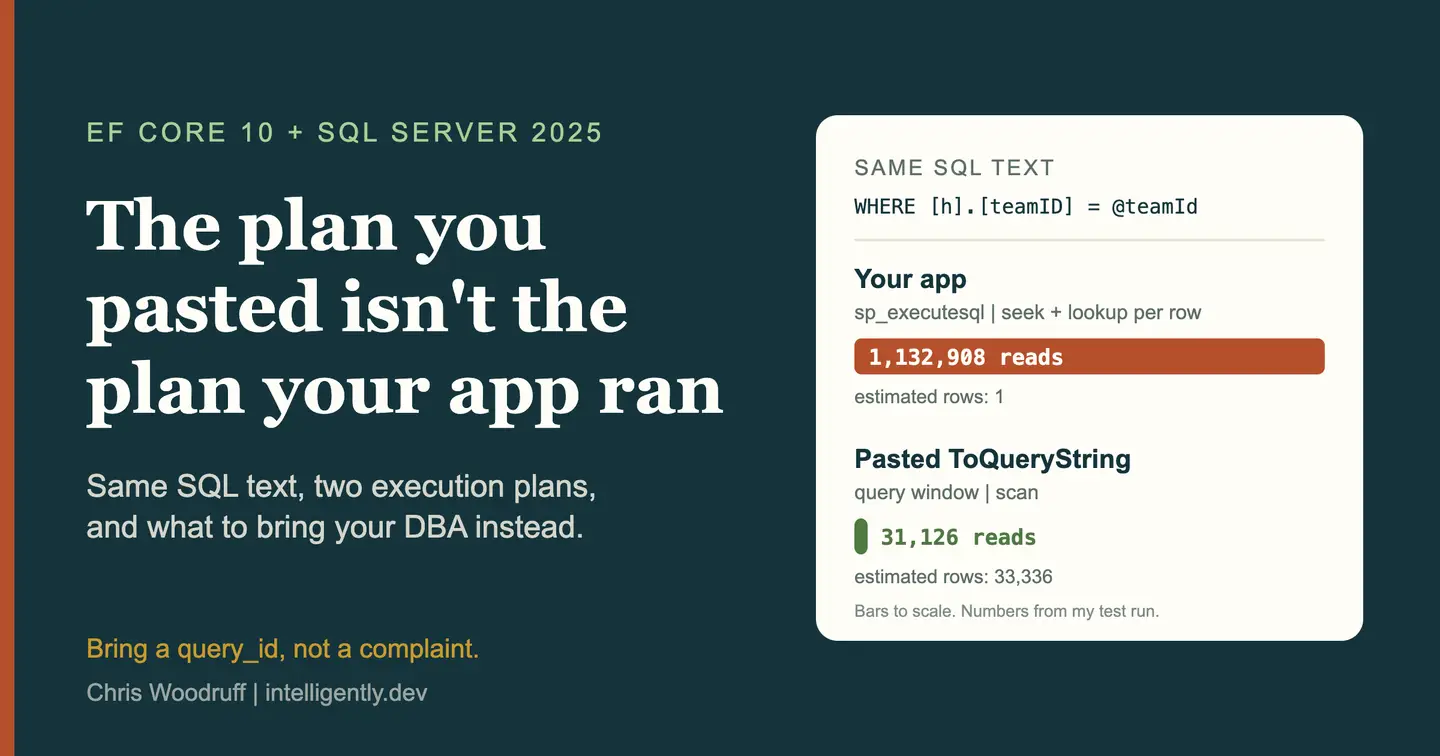
On my test run the little club was 6 logical reads. The Cubs were 1,132,908.
Same C#, same SQL, same server, same minute. One page loads in a flash and the other one is reading over a million pages of data to give you a box score.
The False Clue
So you do what we all do. You call ToQueryString(), paste the SQL into VS Code (or SSMS), run it and have a look at the plan.
I built that exact move into the lab so it happens for real, with both plans side by side:
| The app (sp_executesql) | Index seek plus a key lookup per row | 1 | 1,132,908 |
| A query window (pasted ToQueryString) | Scan | 33,336 | 31,126 |
The pasted query is absolutely fine. It’s a perfectly sensible plan really. You’d look at it, shrug and say “works on my machine”.
Same SQL text, two completely different plans. Tune the one up in the query window and you’ve tuned a plan that your app has never actually run. That’s the moment in the detective story where the obvious suspect has an alibi and everyone goes home.
Why the Same SQL Got Two Plans
EF sends almost every query through sp_executesql with real parameters. The first time SQL Server sees a given SQL text it will have compiled a plan for whatever the parameter values are in that first call, cache that plan and then re-use it for every value thereafter. That’s parameter sniffing and it’s generally a good thing most of the time.
In my case the tiny club was first after the cache was cleared. One row says: seek, nested loops, a lookup per row. That’s the plan that would be used by a club that barely made it through one season. The Cubs came along and got the same plan and did a lookup for every one of their hundreds of thousands of rows. Imagine going through every Cubs hit since 1876 one at a time, walking back to the shelf for each one.
ToQueryString() doesn’t show you that call. It shows you this:
DECLARE @teamId nvarchar(4) = N'CHN';

-- demo:sniff

SELECT [h].[yearID], [h].[playerID], [h].[hitNo]
FROM [Hits] AS [h]
WHERE [h].[teamID] = @teamId
Run that in a query window and @teamId is a local variable not a parameter. SQL Server will have compiled the whole batch before the DECLARE has even run so the optimizer has no idea what the value is going to be. It defaults to the column density which comes out as “an average team” of 33,336 rows. Average team so it chooses a scan. Different starting assumption, different plan.
If you “fix” it by editing the DECLARE into a literal? Now you get a plan compiled for precisely the Cubs. That’s still not the plan your app has. Every road from the query window leads you somewhere other than the scene of the crime.
The Real Plan, and the One Line That Cracks It
Stop re-building the plan. Ask the server for the one it actually used. Since SQL Server 2019 you can in fact keep the last actual plan for every cached statement:
ALTER DATABASE SCOPED CONFIGURATION SET LAST_QUERY_PLAN_STATS = ON;Then pull it:
SELECT qs.execution_count, qs.total_logical_reads, qps.query_plan
FROM sys.dm_exec_query_stats AS qs
CROSS APPLY sys.dm_exec_sql_text(qs.sql_handle) AS st
CROSS APPLY sys.dm_exec_query_plan_stats(qs.plan_handle) AS qps
WHERE st.text LIKE N'%-- demo:sniff%';
That LIKE only works due to the TagWith on the query. Hold that thought.
Now open the plan XML and find the ParameterList. This is the fingerprint:
<ColumnReference Column="@teamId"
ParameterCompiledValue="N'X75'"
ParameterRuntimeValue="N'CHN'" />
ParameterCompiledValue is the value the plan was compiled for. ParameterRuntimeValue is the value it’s running for. Compiled for X75 (the tiny club). Running for CHN (the Cubs). If those two are different and the plan is a stinker, that’s your diagnosis in one line of XML.
I do all of this on a Mac. Open the .sqlplan in VS Code with the MSSQL extension, go to Open XML and search for ParameterCompiledValue. No SSMS required.
Why the Engine Didn’t Save Us
Here’s the twist. SQL Server 2022 introduced Parameter Sensitive Plan optimization (PSP) for precisely this scenario. If it sees an equality predicate on a skewed column it will compile a dispatcher rather than a single plan. At runtime the dispatcher looks at the value and routes it to the plan that was compiled for that range of row counts. The tiny club gets the seek. The cubs get the scan. Case closed before it even opens.
So why didn’t it kick in? In the real world there are two usual culprits.
The first one is the compatibility level. PSP requires database level 160, and a restored backup retains whatever level it was at before the restore. You can have SQL Server 2025 installed and still be getting the SQL Server 2019 optimizer. My own lahman2025 came in at 160, not 170. Go and check your own.
SELECT name, compatibility_level FROM sys.databases WHERE name = DB_NAME();Don’t confuse that with EF’s UseCompatibilityLevel(). That one simply determines what level of T-SQL EF is permitted to generate. EF 10 defaults it to 150, EF 11 (released 10th November) defaults it to 160 and in neither case does that value have any effect on what the optimizer does.
The second suspect is that PSP is picky. On my data, it rejected Batting.teamID for SkewnessThresholdNotMet and ran only on the much larger Hits table. To recreate the scenario in the lab, I simply turned PSP off. Loads of production databases are in that state, and no one has noticed.
The Fixes That Are Yours
Before you even go over to the DBA, some of this is actually something you can fix in LINQ. Here are the four places I always look at first.
Parameters or literals
A captured variable becomes a parameter, a literal in the lambda becomes a literal. EF.Constant (teamId) we’re deliberately inlining a variable so the optimizer sees the real team every time. That would fix the Cubs (at the cost of one cached plan per team). Lahman has well over a hundred team IDs so that’s a lot of plans for one page. Perfect for a short, stable list of values. A terrible idea for a column that has thousands of them.
Contains
ids.Contains(x.Id) has changed its SQL three times across three releases. EF 7 inlined the values (one plan per list). EF 8 and 9 passed a single JSON parameter through OPENJSON (one plan, the optimizer has no visibility into the JSON, on my box it was guessing 50 rows regardless of whether I was asking for 3 teams or 60 teams). EF 10 passes one parameter per element, padded to a bucket size so you get a plan per bucket. My demo did 24 queries and ended up with 8 plans in Constant mode, 1 in Parameter mode and 4 with the EF 10 default. You can set this globally via UseParameterizedCollectionMode or per query via EF.Constant and EF.Parameter.
Optional filters
teamId == null || h. TeamId == teamId is the classic search screen catch-all, and SQL Server 2025 added Optional Parameter Plan Optimization specifically for that. The twist is that EF never generates that at all. It does the null check on the client and fires two separate statements (one with no WHERE clause). That’s perfectly fine (two statements, two good plans), but your DBA is now going to see two queries where you’d only have written one, and the new feature will have absolutely zero chance of getting to play.
Sibling Includes
Two Collection Includes on the same entity will multiply the rows. Load a team’s batting lines and pitching lines in a single query and you’ve got 50 batters x 25 pitchers = 1,250 rows for one team. AsSplitQuery() makes the rows add rather than multiply, at the cost of 3 round trips and no single snapshot of the data. It’s a trade-off. Split can be faster in some cases and not in others so you have to measure. EF 11 also reduces some of the joins that the split queries used to make.
None of that required a DBA. The Cubs still do.
Leave Fingerprints
Your DBA won’t be able to help you with a query they can’t find. In a busy plan cache an EF query is just an anonymous SELECT with a parameter list, as identifiable as a bloke in a gray hoodie. Give it a name and an address and you’ll have a far better chance of tracking it down:
db.Hits
	.TagWith("Team page: hits for one team")
	.TagWithCallSite()
	.Where(h => h.TeamId == teamId);
TagWith puts a comment at the top of the SQL. TagWithCallSite() adds in the file and line number of the C# that generated the query. Both are carried with the SQL, so they appear in the plan cache and in Extended Events.
Then set an application name in the connection string:
Server=...;Database=lahman2025;Application Name=TeamPages;That’s the cheapest filter a DBA can apply to an Extended Events session. If you don’t set one EF 10 will inject its own name with the version info. Set yours anyway as it means something to the person doing the filtering and it ensures your EF and non-EF code are both using the same connection pool.
One caveat, as we’re talking about SQL text. EF 10 renamed the parameters from @\__teamId_0 to @teamId, which is great to read. It also changed the text of pretty much every query your app sends and the plan cache is keyed on text. You’ll get a compile spike straight after you deploy the EF 10 upgrade. Tell your DBA before you ship it rather than after.
The query_id Trap (I Fell In)
Query Store is where a DBA can go and fix a plan without touching your code at all. The unit of everything in Query Store is the query_id. That’s the number you bring.
Two things struck me whilst building the lab.
First of all your tag isn’t in the Query Store text. query_sql_text starts at SELECT so you won’t find your comment in there at all. You have to go to the batch that the query was compiled from which does have the tag:
SELECT q.query_id, q.query_hash, q.query_parameterization_type_desc
FROM sys.query_store_query AS q
CROSS APPLY sys.dm_exec_sql_text(q.last_compile_batch_sql_handle) AS b
WHERE b.text LIKE N'%-- demo:sniff%';
Secondly, remember the ToQueryString() paste? Query Store has that. Same query_hash as the app’s query, same query_id. The parameterization column is what separates them: the app’s call is ‘User’, the pasted batch is ‘None’.
I know this because I put a hint on the wrong one. I hinted the paste, ran the app again and the Cubs did the same million plus reads as before. The fix was sitting on a query no user would ever run. The false clue trailed me all the way through to the end of the case.
Closing the Case
With the right query_id, the DBA attaches a hint, and nobody touches the code or redeploys:
EXEC sys.sp_query_store_set_hints
	@query_id = 5,
	@query_hints = N'OPTION (RECOMPILE)';
Same binary, same SQL text and the Cubs have gone from over a million reads down to tens of thousands. Each team now gets a plan compiled for its own value.
RECOMPILE has a gotcha that people almost never mention. A recompiled statement doesn’t go into the plan cache at all so it has no row in sys.dm_exec_query_stats. Any monitoring that’s based on the plan cache is going to be blind as to that exact query you’ve just fixed. PSP is also turned off for it. You pay that penalty whether the hint comes from Query Store or from your own code (EF has no hint API, though you can have a DbCommandInterceptor which looks for a TagWith("hint:RECOMPILE") comment and appends OPTION (RECOMPILE) to it, that’s about 30 lines of code).
So I think of the hint as today’s fix. The permanent solution is of course to let the engine do the job it was built for:
ALTER DATABASE SCOPED CONFIGURATION SET PARAMETER_SENSITIVE_PLAN_OPTIMIZATION = ON;PSP back on, the little club gets the seek, the Cubs get the scan, and both plans remain in the cache where monitoring can see them. In production, that would normally involve raising the compatibility level to 160 or 170, which would then affect every query in the database. That’s the DBA’s call, and it’s their call to make.
Neither fix had any impact on my code. Both of them required the query_id that I’d provided.
The Message I Send Now
That was the old way that ticket would go: a thread saying “the app is slow”, a query that runs perfectly fine pasted in, “can’t reproduce” and then a reopen a week later. Every now and then someone would go and add an index that nobody had asked the DBA about and suddenly we had two problems.
Here’s what I send now:
query_id: 5 (the app's sp_executesql query, not the pasted one)
tag:      demo:sniff (with TagWithCallSite, the file and line come along)
app:      LinqToQueryPlan
plan:     compiled for N'X75', running for N'CHN'
ask:      Query Store hint today? PSP (compat 160+) for good?
There’s absolutely nothing left for the DBA to guess about. You wrote the C#, EF wrote the SQL, the optimizer wrote the plan and now we’re all looking at the same query.
Bring a query_id not a complaint.
Your Turn
If you write the code, then three tiny changes this week will see your next slow page ticket start with evidence rather than a guess: an Application Name in your connection string, TagWithCallSite() on your hot queries and LAST_QUERY_PLAN_STATS on in dev. If you’re leading a team, then put query_id, tag and app name in your incident template so the good message is the one that ends up in the default.
The lab behind every number is a Razor Pages and htmx app that runs nine EF Core 10 demos against SQL Server 2025 and the same Lahman database that’s behind baseballhistoryproject.com. It takes the actual plan for each query back from the server and displays it alongside the C# that generated it. The demo in this post is demo 1 (the ticket and the false clue) and demo 9 (the query_id and both fixes). There’s a slide by slide learning guide with it. The lab and the talk slides are both on github.com/cwoodruff/efcore-linq-query-plan.
Point it at your own schema and go find your own Cubs (every database has one). If you’ve seen the talk in Prague or you’re just meeting the case for the first time, tell me what you find. I’m woodruff.dev on Bluesky and chriswoodruff on LinkedIn.