How to Delete and Update Millions of Rows in EF Core Without Loading a Single Entity
- Chris Woodruff
- April 8, 2026
- Entity Framework Core
- .NET, C#, Data, databases, dotnet, EF Core, programming
- 1 Comment

This post is sponsored by ZZZ Projects.
The Code Every Developer Has Written and Regretted
Most EF Core performance disasters are not exotic edge cases. They get written in the first sprint, look clean in code review, and only reveal themselves when row counts hit production scale. The pattern below has ended more than a few on-call rotations badly:
// Looks fine. Works perfectly. Scales terribly.

var expired = await context.Sessions

    .Where(s => s.ExpiresAt < DateTime.UtcNow)

    .ToListAsync();

foreach (var session in expired)

    context.Sessions.Remove(session);

await context.SaveChangesAsync();
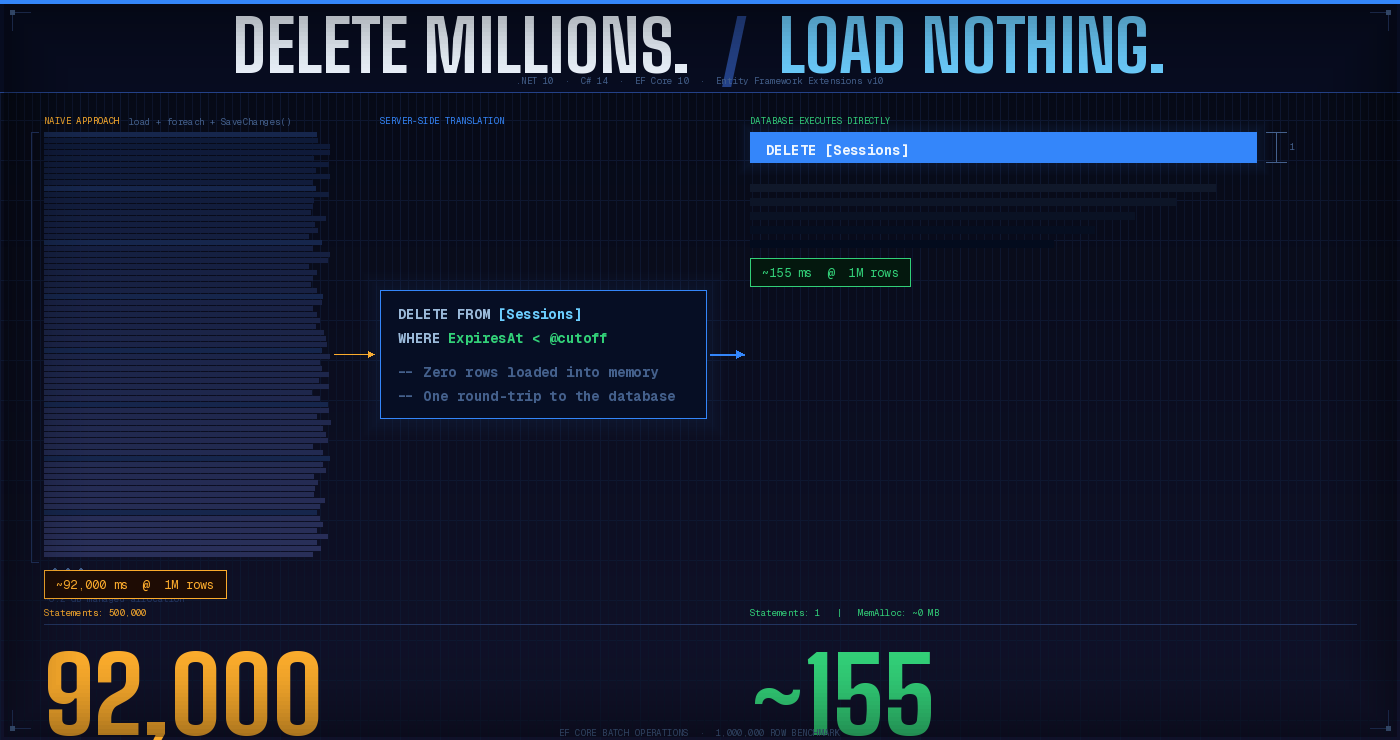
On a development database with a few hundred rows, this is invisible. In production with 500,000 expired sessions, three problems compound against each other at once.
One SELECT loads every matching row into memory. The change tracker allocates an object per entity. At 500K rows, you are burning gigabytes of RAM before a single row is deleted.
SaveChanges emits one DELETE statement per entity. That is 500,000 individual round-trips to the database, each waiting for confirmation before the next one fires.
The N+1 pattern is silent. No warning, no exception. Your application just becomes very, very slow, and your DBA starts forwarding you graphs.
This post covers the real alternatives available in 2026. EF Core 7 introduced native server-side batch operations, and EF Core 10 further refines them. Entity Framework Extensions (EFE) from ZZZ Projects extends the story still further, filling a gap EF Core has not addressed natively. We will cover both honestly, including where the native tools are genuinely sufficient and where EFE earns its place.
The Built-In Answer: ExecuteUpdate and ExecuteDelete
EF Core 7 introduced ExecuteUpdate and ExecuteDelete, two methods that sidestep the change tracker entirely and translate LINQ predicates directly into server-side SQL. Both are available and stable in EF Core 10.
ExecuteDelete
The session cleanup from the introduction becomes:
// One SQL statement. Zero entities loaded into memory.

await context.Sessions

    .Where(s => s.ExpiresAt < DateTime.UtcNow)

    .ExecuteDeleteAsync();

// Generated SQL:

// DELETE FROM [Sessions] WHERE [ExpiresAt] < @cutoff
The query executes immediately. There is no deferred tracking, no SaveChanges() call required. One round-trip. Zero memory pressure from entity loading.
ExecuteUpdate
Deactivating stale customers:
await context.Customers

    .Where(c => c.IsActive && c.LastLoginDate < cutoffDate)

    .ExecuteUpdateAsync(s =>

        s.SetProperty(c => c.IsActive, false)

         .SetProperty(c => c.DeactivatedAt, DateTime.UtcNow));

// Generated SQL:

// UPDATE  SET .[IsActive] = 0, .[DeactivatedAt] = @now

// FROM [Customers] AS

// WHERE .[IsActive] = 1 AND .[LastLoginDate] < @cutoff
Multiple SetProperty calls chain naturally. They all compile into a single UPDATE statement.
What You Need to Know Before Using These
These methods behave very differently from anything EF Core did before version 7. Several gotchas are worth internalizing before they surface in a production incident.
Execution is immediate, not deferred to SaveChanges. The SQL fires the moment you call the method.
These methods are completely change-tracker-unaware. If you have Customer entities already loaded in the current DbContext, their in-memory state will not update. After an ExecuteUpdate, any tracked entities are stale and need to be refreshed or discarded.
EF interceptors do not fire. Business logic, audit logging, or domain events wired through EF Core interceptors will not run for these operations. If you need that behavior, you will need alternative hooks or database-level triggers.
A single call can only target one table. Multi-table updates require restructuring the query.
There is no ExecuteInsert. EF Core 10 has no native equivalent for a server-side INSERT…SELECT. That gap gets its own section next.
Transaction hygiene is your responsibility. If you mix these methods with SaveChanges() in the same request, wrap everything in an explicit transaction. If SaveChanges() fails, ExecuteUpdate changes will not roll back automatically.
The Missing Piece: There Is No ExecuteInsert
If you need to copy rows from one table to another server-side, without loading them into .NET memory first, EF Core 10 still has no native support.
The closest native option is AddRange combined with SaveChanges(), but that requires loading the source rows first:
// Native EF Core -- requires loading source rows into memory first

var archivedAt = DateTime.UtcNow;

var toArchive = await context.Customers

    .Where(c => !c.IsActive)

    .Select(c => new ArchivedCustomer {

        Code          = c.Code,

        Name          = c.Name,

        Email         = c.Email,

        LastLoginDate = c.LastLoginDate,

        ArchivedAt    = archivedAt

    })

    .ToListAsync();  // <- Every row lands in memory here

await context.ArchivedCustomers.AddRangeAsync(toArchive);

await context.SaveChangesAsync();
This is far better than the naive foreach pattern because EF Core 10 batches the INSERTs (up to 1,000 rows per batch by default). But the SELECT still loads every row into .NET objects before any INSERT happens. At 1M rows, that is significant memory pressure, and a gap that EFE fills directly.
EFE’s Batch Operations: UpdateFromQuery, DeleteFromQuery, InsertFromQuery
Entity Framework Extensions (EFE) from ZZZ Projects ships its own set of batch operations that predate EF Core’s native methods and extend them with InsertFromQuery, which EF Core still does not provide.
UpdateFromQuery and DeleteFromQuery
EFE’s update and delete batch operations produce the same server-side SQL as EF Core’s native methods. The practical difference is API style and version reach:
// EF Core 10 -- SetProperty chain style

await context.Customers

    .Where(c => c.IsActive && c.LastLoginDate < cutoffDate)

    .ExecuteUpdateAsync(s =>

        s.SetProperty(c => c.IsActive, false));

// EFE -- lambda assignment style

await context.Customers

    .Where(c => c.IsActive && c.LastLoginDate < cutoffDate)

    .UpdateFromQueryAsync(c => new Customer { IsActive = false });

// Both generate the same SQL.
For a greenfield .NET 10 project with no EFE dependency, ExecuteUpdate and ExecuteDelete are the right defaults. No third-party library needed. EFE’s UpdateFromQuery and DeleteFromQuery become relevant in two situations: you are maintaining a codebase targeting EF Core 6 or earlier where the native methods are not available, or your team already uses EFE for bulk insert operations and wants API consistency across the data layer without mixing two different patterns.
InsertFromQuery: The Gap EF Core Does Not Fill
This is where EFE provides genuine, uncontested value. The archive operation from Section 2 becomes:
// EFE -- server-side INSERT...SELECT, zero entity loading

var archivedAt = DateTime.UtcNow;

await context.Customers

    .Where(c => !c.IsActive)

    .InsertFromQueryAsync(

        "ArchivedCustomers",

        c => new {

            c.Code,

            c.Name,

            c.Email,

            c.LastLoginDate,

            ArchivedAt = archivedAt

        });

// Generated SQL (approximate):

// INSERT INTO [ArchivedCustomers]

//   ([Code], [Name], [Email], [LastLoginDate], [ArchivedAt])

// SELECT .[Code], .[Name], .[Email], .[LastLoginDate], @archivedAt

// FROM [Customers] AS

// WHERE .[IsActive] = 0
The source rows are never loaded into .NET objects. The entire operation, from filtering through projecting to inserting, happens inside the database. Memory usage is effectively O(1) regardless of how many rows are transferred.
Benchmarks: The Honest Numbers
The benchmark project uses BenchmarkDotNet 0.15.8 running on .NET 10 against SQL Server LocalDB. Measurements are mean execution time across 5 iterations after 2 warm-up rounds. Memory figures are managed allocations per operation as reported by BenchmarkDotNet’s MemoryDiagnoser.
UPDATE Benchmarks: Deactivate Matching Customers
| Row Count | Load + SaveChanges | ExecuteUpdate (EF Core 10) | UpdateFromQuery (EFE) |
| 10K | ~473.0 ms | ~157.6 ms | ~187.7 ms |
| 100K | ~4,527.3 ms | ~1,712.6 ms | ~1,706.1 ms |
| 500K | ~17,768.6 ms | ~8,222.7 ms | ~8,259.6 ms |
| 1M | ~34,674.0 ms | ~14,517.4 ms | ~16,913.3 ms |
DELETE Benchmarks: Remove Matching Customers
| Row Count | Load + RemoveRange | ExecuteDelete (EF Core 10) | DeleteFromQuery (EFE) |
| 10K | ~395.08 ms | ~100.6 ms | ~130.2 ms |
| 100K | ~3,252.91 ms | ~864.8 ms | ~1976.5 ms |
| 500K | ~15,137.00 ms | ~4,170.2 ms | ~12,364.2 ms |
| 1M | ~32,588.83 ms | ~8,782.8 ms | ~29,784.2 ms |
INSERT Benchmarks: Archive Inactive Customers to a Secondary Table
| Row Count | Load + Project + SaveChanges | InsertFromQuery (EFE) |
| 10K | ~350.78 ms | ~37.21 ms |
| 100K | ~2,668.93 ms | ~150.51 ms |
| 500K | ~13,646.34 ms | ~618.54 ms |
| 1M | ~26,732.17 ms | ~1,200.44 ms |
Reading the Results
Two patterns emerge across all three suites.
The naive approach scales linearly with row count. Going from 10K to 1M rows takes roughly 100x longer and uses roughly 100x more memory. This is expected: you are allocating 100x as many objects and issuing 100x as many SQL statements.
Server-side approaches scale almost sub-linearly. The primary cost is SQL Server query planning and I/O throughput, not .NET object allocation or round-trip count. Going from 10K to 1M rows takes roughly 10x longer for a simple predicate-based operation, and memory usage stays near-constant regardless of row count.
EF Core native and EFE are practically equivalent for UPDATE and DELETE. The delta between ExecuteUpdate and UpdateFromQuery is noise at these row counts. Both translate to the same underlying SQL. Your choice between them should be based on version compatibility and team conventions, not performance.
InsertFromQuery is in a category of its own. There is no native EF Core equivalent, so the comparison is between loading rows into memory and not doing so at all. The allocation difference is the most striking signal: the naive approach allocates proportional to row count; InsertFromQuery allocates near-zero.
Choosing the Right Tool
Here is how to think about which approach to reach for:
| Scenario | Recommended Approach | Why |
| Uniform rule applied to all matching rows (same value to every row) | ExecuteUpdate / ExecuteDelete | Native, zero dependencies |
| Simple server-side DELETE or UPDATE, EF Core 7+ target | ExecuteDelete / ExecuteUpdate | No reason to add EFE for these |
| Server-side UPDATE or DELETE, pre-EF Core 7 codebase or EFE already in use | UpdateFromQuery / DeleteFromQuery (EFE) | API consistency across data layer |
| Table-to-table INSERT…SELECT without loading entities | InsertFromQuery (EFE) | EF Core 10 has no native equivalent |
| Per-row values (each entity has different data to update) | BulkUpdate (EFE) | ExecuteUpdate only supports uniform set-based rules |
| Mixing batch ops + SaveChanges in the same request | Wrap in an explicit transaction | Neither approach participates automatically |
A useful starting point: reach for EF Core native methods first. If you hit a scenario where they fall short, whether that is a pre-EF Core 7 target, a need for InsertFromQuery, or a requirement to update per-row values with BulkUpdate, that is when EFE earns its dependency cost.
Caveats That Will Catch You Off-Guard
Both the native EF Core approach and EFE’s batch operations share a set of behaviors that are easy to miss the first time.
Stale In-Memory Entities
After any server-side batch operation, entities already loaded in the current DbContext are stale. The database has changed; the change tracker has not. Reload or discard them explicitly:
await context.Customers

    .Where(c => !c.IsActive)

    .ExecuteDeleteAsync();

// Clear tracked entities -- they no longer exist in the database

context.ChangeTracker.Clear();
Transaction Hygiene Is Your Responsibility
If you mix batch operations with SaveChanges() in the same unit of work, wrap the entire block in an explicit transaction:
await using var tx = await context.Database.BeginTransactionAsync();

await context.Orders

    .Where(o => o.IsCancelled)

    .ExecuteUpdateAsync(s => s.SetProperty(o => o.Status, OrderStatus.Archived));

// Other tracked changes...

await context.SaveChangesAsync();

await tx.CommitAsync();

// If SaveChanges() threw above, ExecuteUpdate is rolled back too.
Cascade Rules and Interceptors
EF Core’s configured cascade delete behaviors will not fire for ExecuteDelete or DeleteFromQuery. Database-level foreign key cascades will still run. EF Core interceptors and domain events do not fire for any batch operation. If audit logging or domain logic lives in those hooks, the typical alternatives are database triggers or application-level pre/post hooks.
SetProperty Has Limits That BulkUpdate Does Not Share
ExecuteUpdate applies the same transformation to every matching row. If you need to update 10,000 customer records each with a different value, say updated addresses from an import, you need EFE’s BulkUpdate, not ExecuteUpdate. They are different tools for different problems.
Conclusion
EF Core 10 has closed the performance gap that made batch operations a problem for most teams. ExecuteUpdate and ExecuteDelete are production-ready, require no external dependencies, and should be your default for any set-based update or delete operation on EF Core 7 or later.
Entity Framework Extensions extends that story in two directions. For teams maintaining pre-EF Core 7 codebases, UpdateFromQuery and DeleteFromQuery provide the same server-side semantics with a consistent API. InsertFromQuery addresses a genuine gap in EF Core’s toolbox: server-side table-to-table INSERT operations without loading source rows. It has no native equivalent in EF Core 10.
The benchmark numbers make the case plainly. The naive pattern (load, modify, save) scales linearly with row count in both time and memory. Server-side operations scale to millions of rows with near-constant memory overhead and far lower elapsed time. At 1M rows, the difference between the naive approach and any server-side alternative is measured in orders of magnitude rather than percentages.
The next post in this series covers EF Core Bulk Insert in depth: from AddRange through SqlBulkCopy to EFE’s BulkInsert with IncludeGraph, and what to choose at each scale threshold.

Related Posts


Jochen Kühner
You can also look at linq2db, it supports also joins in update and delete queries, and also many more linq functions EFcore dors not. And it can be used with EFcore