Stop Wrestling with JavaScript: htmxRazor Gives ASP.NET Core the Component Library It Deserves
- Chris Woodruff
- February 25, 2026
- htmx
- .NET, asp.net core, C#, dotnet, programming, web development
- 2 Comments
Here is an uncomfortable truth the ASP.NET Core community has been avoiding for too long: server-rendered web development should not require you to adopt React, Vue, or Angular just to get a decent set of UI components.
For years, .NET developers have been stuck choosing between two bad options. You can wire up Bootstrap by hand, bolting htmx attributes onto generic HTML and writing the same boilerplate for every project. Or you can adopt Blazor, pulling in a 2 MB WebAssembly runtime to get component abstractions that were designed for a completely different rendering model.
Neither path respects the developer who chose server rendering on purpose.
That gap is exactly why htmxRazor exists.
What htmxRazor Actually Is
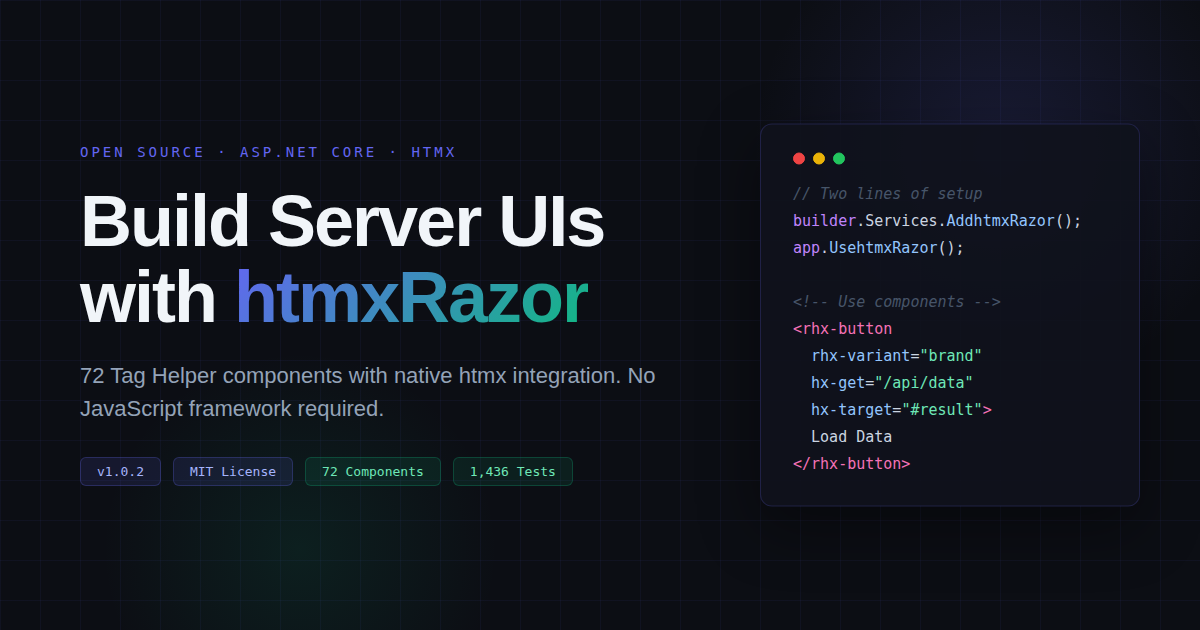
htmxRazor is an open-source UI component library built as ASP.NET Core Tag Helpers. It ships 72 production-ready components across 10 categories: buttons, form controls, dialogs, tabs, navigation, carousels, data visualization, feedback indicators, and more. Every component renders clean, semantic HTML on the server and treats htmx attributes as first-class properties.
That last point matters. This is not a generic component library with htmx compatibility tacked on as an afterthought. When you write hx-get, hx-post, hx-target, or hx-swap on an htmxRazor component, the Tag Helper understands those attributes and renders them correctly within its own markup structure.
Setup takes two lines of code in Program.cs:
builder.Services.AddhtmxRazor();
app.UsehtmxRazor();
Register the Tag Helpers in _ViewImports.cshtml, and you are building with components immediately. No webpack configuration. No npm install. No bundler. One NuGet package.
@using htmxRazor.Example
@namespace htmxRazor.Example.Pages
@addTagHelper *, Microsoft.AspNetCore.Mvc.TagHelpers
@addTagHelper *, htmxRazor
The Problem with the Status Quo
Think about what happens on a typical ASP.NET Core project that uses htmx today.
You start with raw HTML or Bootstrap. You add htmx for interactivity. Then you spend hours wiring up form validation, building accessible dialogs, creating tab components, and making everything work with ASP.NET Core’s model binding. You repeat this work on the next project. And the next.
Blazor solves the component problem but introduces its own complexity. You need WebAssembly or SignalR, you lose the simplicity of standard HTTP request/response patterns, and you carry a runtime that dwarfs the size of most applications it serves. For teams that chose Razor Pages or MVC because they wanted a lighter model, Blazor feels like trading one set of problems for another.
htmxRazor targets the developers caught in that middle ground: people who like server rendering, who like htmx, and who want real components without the overhead.
72 Components, Zero Client-Side Runtime
The component catalog covers real application needs across ten categories.
Actions include buttons with eight variants (brand, success, danger, neutral, and more) plus button groups and dropdowns. Forms give you inputs with model binding, textareas, selects, comboboxes, checkboxes, switches, radio groups, sliders, ratings, color pickers, file inputs, and number inputs. All of these integrate with ASP.NET Core’s ModelExpression for automatic label generation, type detection, and validation message rendering.
Feedback components cover callouts, badges, tags, spinners, skeleton loaders, progress bars, progress rings, and tooltips. Navigation includes tabs, breadcrumbs, tree views, and carousels. Overlays provide dialogs, drawers, and collapsible details panels.
Beyond the basics, htmxRazor includes imagery components (icons with 43 built-in glyphs, avatars, animated images, before/after comparisons, zoomable frames), formatting helpers (bytes, dates, numbers, relative time), utility components (copy buttons, QR codes, animations, popups, popovers), and composite patterns like active search, infinite scroll, lazy loading, and polling.
Every one of these components renders server-side. The total bundle shipped to the browser is CSS plus the htmx script, roughly 14 KB gzipped. Compare that to Blazor’s 2 MB WebAssembly runtime or even Bootstrap’s 24 KB JavaScript plus 22 KB CSS.
A Real Design System, Not a Bootstrap Wrapper
htmxRazor owns its entire visual system. It does not depend on Bootstrap, Tailwind, or any external CSS library.
The design system is built on CSS custom properties (design tokens) that control colors, spacing, typography, borders, shadows, and every other visual decision. Components use BEM naming with an rhx- prefix, keeping CSS specificity predictable and collisions nonexistent.
Theming works through a single attribute on the <html> element:
<html data-rhx-theme="light">
Switch to dark mode by changing that value to "dark", or toggle it programmatically with RHX.toggleTheme(). Every component responds to the theme change automatically because all styling flows through the token system.
You can override any design token with standard CSS:
:root {
    --rhx-color-brand-500: #6366f1;
    --rhx-radius-md: 0.75rem;
}
This means htmxRazor adapts to your brand identity without requiring you to fork the source or fight against opinionated defaults.
Accessibility Is Not an Afterthought
Every component ships with semantic HTML, appropriate ARIA attributes, keyboard navigation, and screen reader support. This was a design goal from the start, not something bolted on after the component catalog was complete.
Form components generate proper <label> associations. Dialogs trap focus. Interactive elements respond to keyboard events. The markup each component produces passes automated accessibility checks.
For teams working under WCAG compliance requirements, this saves significant effort compared to building accessible patterns from scratch on every project.
1,436 Unit Tests
The library includes 1,436 unit tests covering Tag Helper rendering behavior. These tests verify that components produce correct HTML structure, that attributes propagate properly, that model binding generates expected output, and that accessibility markup is present.
This is not a weekend experiment or a proof of concept. The test suite reflects the kind of coverage you need before trusting a component library in production applications.
Who Should Care About This
If you are building with ASP.NET Core and you have already chosen (or are considering) htmx for interactivity, htmxRazor removes the boilerplate between your decision and your working UI.
If you are evaluating whether to adopt Blazor or stick with Razor Pages, htmxRazor offers a third option: keep the server-rendered model you prefer, get real components, and add interactivity with htmx’s simple attribute-based approach.
If you are building internal tools, admin panels, or line-of-business applications where developer productivity matters more than chasing the newest client-side tooling, 72 prebuilt components with model binding and validation integration will save you weeks of work per project.
Get Started
Install from NuGet:
dotnet add package htmxRazor
See every component with live examples at htmxRazor.com.
Browse the source, file issues, or contribute at github.com/cwoodruff/htmxRazor.
The project is MIT licensed and accepting contributions. If server-rendered components with htmx integration solve a problem you have been working around, give htmxRazor a look and let the project know what you think.
Related Posts





Dave Erwin
This looks great. But on htmRrazor.com the property, type, and default in the properties section aren’t displayed in the light theme. Shows fine on the dark theme. Happens in both Safari and Brave on macOS.
Chris Woodruff
Thanks, Dave, for the feedback, and things have been updated. I hope you try htmxRazor more and give your honest feedback.